
WordPress guide
Contact Form 7: sign straight after sending
Connect a Contact Form 7 form to a SignSealer workflow once, and every message sent ends on the signing page.
Before you start
- The plugin installed and this site connected (the getting-started guide).
- Contact Form 7, active, with the form you want signed.
- A form in SignSealer, under Forms & QR, made from the template the customer should sign. The plugin calls it a workflow.
What happens next
- Contact Form 7 keeps no entries of its own, so see who signed in SignSealer.
- Fields are listed by their tag names, the ones in the form's editor.
Step by step
The words in bold are the words on the screen. Press a picture to see it full size.
Open SignSealer → Forms
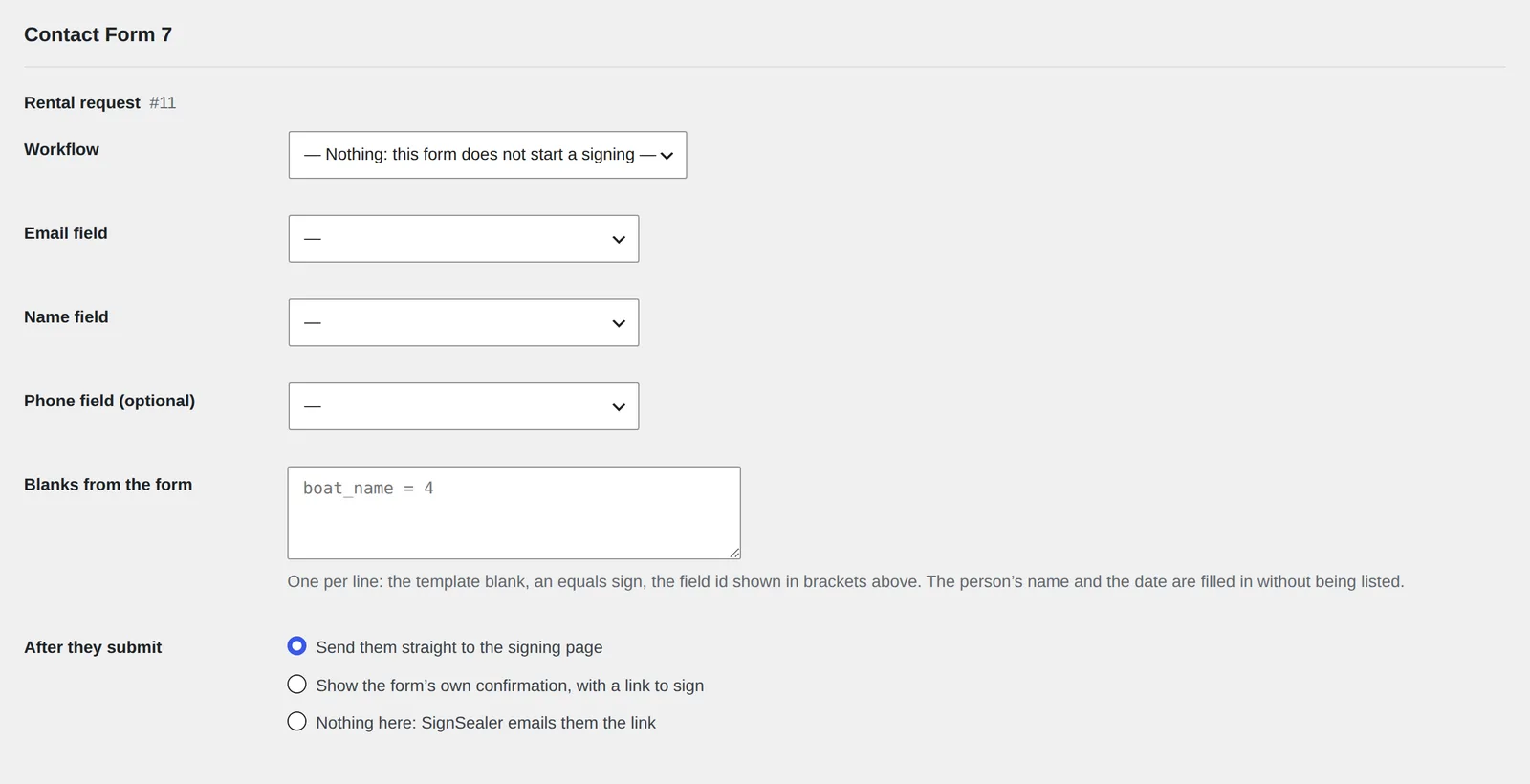
In the WordPress menu, open SignSealer → Forms. Every Contact Form 7 form on the site is listed under its own heading, with its title and number.
Choose the workflow
Beside Workflow, choose the form in SignSealer this one should start. A form left on Nothing works exactly as it did before.

Say which fields hold the email and the name
Choose the Email field and the Name field from the form's own fields; the number in brackets is the field's id. Add the Phone field if you send reminders by text. Only the fields you choose are sent to SignSealer.

Fill other blanks from the form (optional)
If the template has blanks like a boat name or a pickup date, write one line for each under Blanks from the form: the blank's name, an equals sign, and the field id — for example
boat_name = 4. The person's name and today's date are filled in without being listed. Dates and times from the form are written out in words on the agreement.Choose what happens after they submit
Send them straight to the signing page is what most people want. Show the form's own confirmation, with a link to sign keeps your confirmation message and adds the link to it. Nothing here: SignSealer emails them the link leaves the form as it was and lets the email do the work.

Save, and try it
Press Save, then fill the form in yourself on the page where it lives. With Send them straight to the signing page you are taken to SignSealer's page once the message is sent; with the link option, it appears under the form's own message.
If something is not right
The form sends but nothing happens.
Contact Form 7 starts the signing only when its mail is sent successfully. If the form shows an error, fix the mail settings first.
Still stuck? Tell us what you see and which plugins the site runs.
The other guides
Getting started
Install the plugin, connect it to your SignSealer account with one button, and make the document your customers sign. About ten minutes.
WooCommerce
Mark the products that need an agreement. The customer signs after paying, on ordering, or before payment at checkout, and the order shows it.
WooCommerce Bookings
A booking you confirm starts its agreement straight away, paid or not, with the date, time, party size and resource filled in.
Gravity Forms
Connect a Gravity form to a SignSealer workflow once. Each submission ends on the signing page, with the person's details already on the agreement.
WPForms
Connect a WPForms form to a SignSealer workflow once, and every submission ends on the signing page with its details already on the agreement.
Fluent Forms
Connect a Fluent form to a SignSealer workflow once, and every submission ends on the signing page with its details already on the agreement.
Signing button
The SignSealer agreement block or a shortcode puts a Sign now button on any page: for walk-ups, a class page, or a form plugin not supported yet.

Ready when the next guest is.
Free for the first 25 agreements a month. No card to start.